
Data Representation
-
We use a base 10 system, meaning that we have 10 possible characters that can represent a number, all numbers are combinations of numbers from 0 to 9, they are called denary numbers
-
Computers use a base 2 system, meaning that computers can only understand 0 and 1,each digit in binary represent a number depending on its postion, there are 8 numbers either 0 or 1 and each position corresponds to a value which is added up to 255
-
Denary numbers: which are also known as decimal numbers are written using following symbols 0,1,2,3,4,5,6,7,8,9 for each denary digit
-
Binary numbers: base 2 numbers, made up of bits, computers need to recieve information in binary in order to process if
-
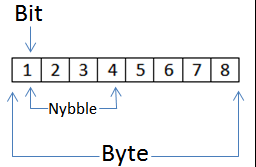
Bit: a binary digit written using either of the symbols 0 and 1
10110110
-
A nibble: a group of 4 bits
-
A byte: a group of 8 bits
-
Conversion between binary to denary: since binary is a base-2 system, we can write it as:
Binary magnitudes: units used while representing the size of a file
Adding Binary
-
Rules to follow
-
1+1=0 and carried with 1
-
1+1+1=1 and carried with 1
-
Tips
-
Ensure all numbers are in correct column
-
Convert your binary result into denary to check
Overflow error- occurs when a larger number of bits is generated , as we can see from image above, after addition the binary number became 9 bits because of overflow error
-
Two’s complementary:
-
Two’s complement is a method used to represent negative values in binary. It is performed by flipping bits and adding 1 to one's complement value
-
Two’s complement:
-
adding 1 to one’s complementary form
-
One's complement
-
flipping the bits, changing 1 to 0 and 0 to 1
Hexadecimal
-
Hexadecimal is a base 16
-
1 hexadecimal digital can represent 4 bits(nibble) of binary
-
it is easier to read as it is a base of 16 so more digits can represent a value
-
it is easier to spot errors in code
Converting Hexadecimal
Hexadecimal to denary
Multiply first digit with 16 and second with 1,add them up to get denary value
Denary to hexadecimal
Devide number by 16 and find remainder
For example 187/16=11 remainder 11 which is
hexadecimal value BB
Binary to hexadecimal
Split binary value into 2 nibbles, convert into hexadecimal numbers
Use of Hexadecimal
-
Defining colours in Hypertext Markup Language (HTML)
-
Media Access Control (MAC) addresses (a number that uniquely identifies a device on a network)
-
Assembly languages and machine code
-
Memory Dumps
-
Debugging (method to find errors in a program)
-
Display error codes (numbers refer to the memory location of the error)
-
IP (Internet Protocol) addresses
ASCII
American Standard Code for Information Interchange
In 1960, the American Standard Association agreed on a set of codes to represent the main characters in the English language.Bellow are number of characters
Letters of the alphabet (lower case) 26
Letters of the alphabet (upper case) 26
All numeric symbols 10
Punctuation, symbols and ‘space 33
Codes reserved for non-printable control codes32
95 (printable)
32 (non printable)
127 in total
But ASCII has problem of different languages, some languages have more than 127 characters, so they cannot fit in a byte. UNICODE solves this problem, by using 32 bits (2sets of 16 bits) to represent every character in various languages


Sound
Sound is analogue data, computers cannot process it, so that is why we need to sampled it before transferring it to computer.
General terms
Sampling is process of converting analogue sound to digital data so that computers can understand and process it.Sound is sampled with ADC(analogue digital converter)
Sound has its own properties, such as Amplitude which controlls loudness of sound
Frequency controlls pitch of sound
Sampling Rate
-
The sampling rate is the number of sound samples taken per second, which is measured in Hertz (Hz) .
-
A higher sampling rate would allow more accurate sound as fewer estimations will be done between samples.
Sampling Resolution(Bit rate)
-
The number of bits per sample is known as the sampling resolution (aka bit depth)
-
Increasing the sampling resolution increases the accuracy of the sampled sound as more detail is stored about the amplitude of the sound.
-
Increasing the sampling resolution also increases the memory usage of the file as more bits are being used to store the data.
-
Measured in kilobits per second (Kbps)
Sound calculations
With sample resolution
1Convert the time in to seconds
2.File size (bits) = Sampling rate (Hz) × Resolution (bits) × Length of sample (seconds)
3.If the resolution is in bytes and the question requires a file size in bits then then multiply by 8.
With bitrate
1. Convert the Kbps to bits by multiplying by 1024
2. Convert the time into seconds
3. Multiply the bits by the seconds
4. To convert into bytes divide the answer by 8
5. Convert to kilobytes by dividing by 1024 (divide again to convert to megabytes)

Topic 1 - Data representation
In this section you will find out how computers process and display data
IMAGES
Bitmap images
-
Bitmap images are made up of pixels
-
A bitmap image is stored in a computer as a series of binary numbers
-
Uses more storage to store
-
Images become pixilised when zoomed in
Vector Images
-
Less memory to store is needed
-
More power usage
-
Images don't vecome pixilised when zoomed in
-
induvidual
Colour Depth
-
The number of bits representing each colour is called the colour depth.
-
An 8-bit colour depth means that each pixel can be one of 256 colours (because 2 to the power of 8 = 256)
-
A 1-bit colour depth means each pixel can store 1 colour (because 2 to the power of 1 is 2) - ( This is done as the bit can either be 0 or 1, with 0 being white and 1 being black)
-
Increasing colour depth increases the size of the file when storing an image
Image Resolution
-
image resolution refers to the number of pixels that make up an image; for example, an image could contain 4096 × 3072 pixels.
-
Photographs with a lower resolution have less detail than those with a higher resolution.
-
When a bitmap image is ‘ blurry ‘ or ‘ fizzy ’ due to having a low amount of pixels in it or when zoomed, it is known as being pixelated.
-
High-resolution images use high amounts of memory as compared to low-resolution ones.


COMPRESSION
Compression
The process of reducing size of file
Why do we compress files?
Less storage space required
Faster download times – improving online experience
Faster streaming speeds of video/audio files
Lossy Compression
-
unnecessary bits of data like MP3 and JPEG formatshe file compression algorithm removes
-
It is impossible to get the original file back once it compressed
-
Reduces file quality
-
In this, the resolution of the image is reduced, and colour depth is reduced
Lossless compression
-
While compression data is removed temoporarily, when file is unzipped data is restored
-
Exapmple of lossless compression is ZIP file
Run Length Encoding (RLE)
-
Simple form of lossless compression
-
Usually compresses bitmap images
-
Data is rebuild when file is unzipped
-
Stored as single value

by: Arnur Mussabekov